The business cost of inaccessible digital products

Digital accessibility often enters management discussions as a compliance topic. Yet the financial impact of an inaccessible website or application begins long before a complaint reaches the legal department.
The same barrier may generate additional work for the support team, require an urgent development task, or lead an unsatisfied user to file a complaint with a supervisory authority, potentially resulting in an audit, mandatory remediation or a financial penalty.
Most of these costs remain hidden across separate budgets and reports:
- Lost transactions appear as ordinary checkout abandonment.
- Support teams record another customer call.
- Developers receive an isolated bug report.
- Legal and compliance teams become involved only when the problem has already escalated.
This is why accessibility debt gets easily underestimated.
According to the World Health Organization, around 1.3 billion people – 16% of the global population – experience a significant disability. The audience affected by accessibility barriers is broader still. The W3C explains that accessible digital products also work better for older users, people with temporary injuries, mobile users and people operating devices in difficult conditions, such as bright sunlight or noisy surroundings.
Although accessibility benefits a broad range of users, many websites still contain barriers that make everyday tasks difficult or impossible. The WebAIM Million study gives an indication of how widespread these issues are. Its 2025 analysis detected WCAG-related failures on 94.8% of the one million home pages tested.
Shopping websites averaged 71.2 detectable errors per home page – almost 40% more than the overall average.
Automated testing finds only some types of problems, so these figures do not represent the full extent of inaccessible experiences.
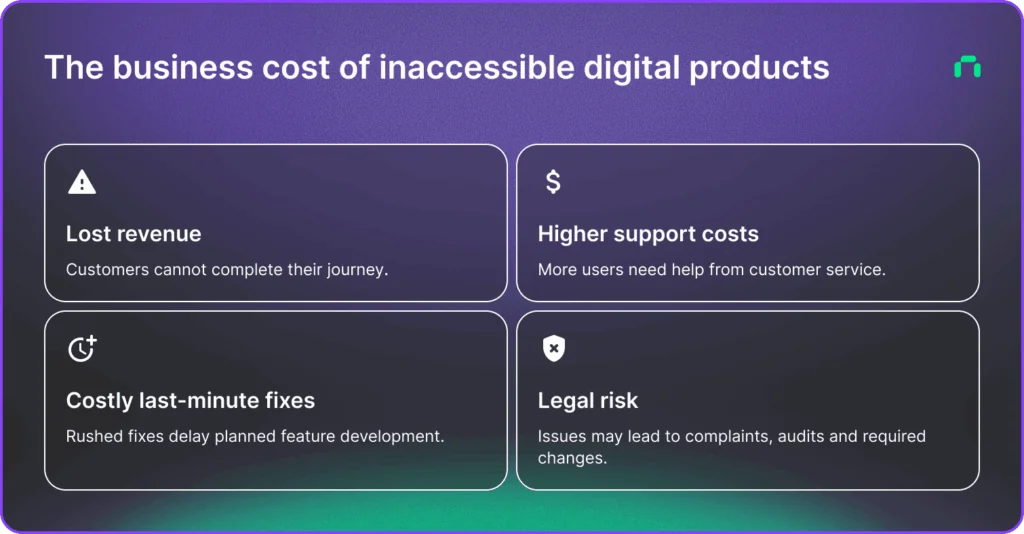
These barriers affect both revenue and day-to-day operations. For e-commerce businesses, the resulting costs usually appear in four areas:
- revenue lost when customers cannot complete their journey,
- higher customer service costs,
- remediation work performed under time pressure,
- complaints, supervisory action and related legal risk.
Usually, these are connected, which means one inaccessible checkout can affect every category at once.
1. Lost transactions and lower conversion rates
When an inaccessible digital product interrupts customer intent
A person may arrive from an advertisement, compare several products, add one to the basket and then discover that the checkout cannot be completed using a keyboard. Another customer may abandon a registration form because the error messages are not associated with the relevant fields. A screen reader user may be unable to identify an unlabelled payment button. Someone using a phone outdoors may struggle to read text with insufficient contrast.
From the customer’s perspective, the outcome is simple: the purchase cannot be completed easily enough.
From the company’s perspective, the cause is harder to identify. Analytics may record a bounce, an abandoned cart or a failed form submission. They rarely show that the user could not perceive or operate an interface element.
This creates a measurement gap. An e-commerce team may react by changing prices, simplifying delivery options or launching remarketing campaigns while leaving the original interface barrier unaddressed – so the same problem continues to affect other users.
Accessibility problems can affect every stage of the funnel
Revenue loss is rarely limited to checkout. Barriers may appear during:
- navigation and product search,
- filtering and sorting,
- product comparison,
- account creation,
- address entry,
- authentication,
- discount code entry,
- selection of delivery and payment methods,
- order confirmation,
- returns and complaint procedures.
A customer who encounters one barrier may still continue. But after several barriers, leaving the website becomes the easier option.
The 2019 Click-Away Pound survey estimated that inaccessible retail websites redirected £17.1 billion in UK consumer spending away from businesses. The study was based on self-reported behaviour and should not be treated as a universal conversion benchmark. It does, however, illustrate the commercial scale of customers moving their spending when a store is difficult to use.
Better accessibility means better usability
Accessibility also affects customers who may never describe themselves as disabled. Clear forms, visible focus states, readable contrast, predictable navigation and larger interaction areas help people using small screens, users with a temporary injury and customers trying to place an order while distracted or under time pressure. The W3C connects accessible design with better overall user experience and customer satisfaction across devices and situations.
For management teams, this makes accessibility part of conversion optimisation. It affects how much existing traffic can move through the funnel.
How to estimate the revenue at risk
You don’t need a perfect attribution model to begin estimating the cost.
Start with the journeys that generate revenue and examine:
- The number of users entering each journey.
- The conversion rate at each step.
- Accessibility barriers found during testing.
- The share of customers who may be unable to proceed.
- Average order value or customer lifetime value.
A simple model can use:
Affected sessions × conversion gap × average order value
The result will still be an estimate. It gives decision-makers a clearer view than treating every accessibility defect as an isolated technical ticket.
In an ideal scenario, testing web accessibility should combine automated tools, manual reviews and sessions with people who use assistive technology. Automated tools can find problems such as low contrast, missing labels and empty buttons. They cannot reliably assess every interaction, message or customer journey.
Book an accessibility audit for your ecommerce store
Find barriers that may affect customers, conversions and EAA compliance.
2. Higher customer service costs
When digital self-service fails, customers move to assisted service – this means more tickets to solve for your support team.
A person who cannot complete a purchase may call the support line. Poeple unable to download invoices will reach out through chat or email. A customer who cannot use an online returns form may send a message asking an employee to process the return manually.
The support team becomes an alternative interface for the website. This increases the cost of each affected journey. A transaction designed to be completed without employee involvement now requires:
- an incoming call, email or chat,
- time spent understanding the problem,
- identity verification,
- manual entry or correction of customer information,
- communication with another department,
- follow-up with the customer.
Some cases take longer because the support agent cannot see the accessibility barrier or reproduce it in the same environment. The issue may be recorded as a customer misunderstanding, browser problem or generic technical error.
Support data can therefore understate the source of the problem in the same way that analytics data does.
Assisted service does not fully recover the transaction
Moving a customer to a support channel does not guarantee that the sale will be saved. The customer may contact the company outside service hours, and the waiting time may exceed the value of the purchase. Some people will be unwilling or unable to use a phone. Others may have chosen online service specifically because it offers more independence than an in-person or voice-based interaction.
An inaccessible self-service process therefore creates two costs:
- the operational cost of additional contacts,
- the revenue from customers who leave without contacting support.
And while the first appears in the customer service budget, the second may remain invisible.
Support contacts can reveal accessibility debt
Customer service records can become an early warning system when teams use the right categories.
Useful signals include repeated reports that customers:
- cannot select an option,
- cannot find or activate a button,
- do not understand a validation message,
- cannot complete CAPTCHA,
- cannot enlarge content without losing functionality,
- cannot operate a form using a keyboard,
- cannot access a document or confirmation,
- need an employee to complete a standard online task.
These cases should be shared with product, UX, development and accessibility teams. Repeated support workarounds often point to a product problem, not a training problem for agents.
A practical cost model can use:
Accessibility-related contacts × average handling time × cost per support minute
The calculation can include escalation time, manual processing and repeat contacts. Even a partial estimate helps compare the cost of recurring support work with the cost of fixing the customer journey in the product interface.
3. The cost of last-minute fixes
Accessibility problems become more expensive when they remain in a product for months or years. A missing label in one new component may take minutes to correct. The same pattern embedded in dozens of templates, applications and third-party integrations can require coordinated changes across several teams.
Delaying accessibility fixes may lead to:
- redesigning reusable components,
- changing brand colours and design tokens,
- rebuilding keyboard interactions,
- rewriting form validation,
- correcting content and documents,
- replacing inaccessible third-party tools,
- retesting integrations,
- updating mobile applications,
- training product and content teams,
- checking that fixes do not create regressions.
Each dependency increases the amount of planning, development and quality assurance required.
The W3C advises organisations to include accessibility from the beginning of a project because this reduces the need to return to completed work and rebuild it later. Its business case also points to lower maintenance and service costs when accessibility is integrated into ongoing development cycles.
Build your digital product with accessibility in mind from day one.
Rushed fixes get in the way of planned work
A planned accessibility programme can prioritise customer journeys, update a design system and distribute work across development cycles. A deadline triggered by a complaint changes the conditions.
Your team may then need to:
- audit several products at once,
- pause planned releases,
- reassign developers,
- commission external legal and accessibility support,
- produce documentation for authorities or clients,
- renegotiate work with technology suppliers,
- release fixes with limited testing time.
The cost includes the remediation budget and the work that teams could not complete during the same period. Product improvements, experiments and commercial releases may be postponed while accessibility debt is addressed.
This is why the cheapest-looking decision – delaying accessibility work – can produce a higher total cost of ownership.
Accessibility can reduce ongoing maintenance costs
A W3C case study describes the results of an accessibility-led redesign carried out by Legal & General. The company reported a 66% reduction in website maintenance costs, twice as many visitors requesting quotations and a reduction in accessibility complaints to zero.
The project was completed in 2005, so its figures should not be used as a current forecast. The case still demonstrates an important relationship: work on structure, usability, performance and accessibility can improve commercial and operational measures at the same time.
Accessibility should therefore enter product planning alongside performance, security and maintainability. Treating it as a final audit task leaves teams with fewer options and more expensive fixes.
4. Complaints and supervisory action
Since 28 June 2025, national measures implementing the European Accessibility Act apply to covered products and consumer services in the EU. The scope includes e-commerce, consumer banking services, e-books, electronic communications and selected transport services, as well as products such as payment terminals, smartphones and computers.
Accessibility failures can now trigger more than negative customer feedback.
A complaint may trigger a formal accessibility assessment and correspondence with a supervisory authority. The organisation may also be asked to provide technical and organisational documentation or carry out mandatory accessibility fixes.
The case may require legal review and management involvement, especially when responsibilities are shared with external suppliers. In some situations, it can also lead to supplier disputes, public communication and reputational damage.
The financial outcome extends beyond a possible penalty. Internal employees, external advisers and development teams all spend time responding. Projects may require changes in priorities. A company may also have to explain why barriers remained undetected after the applicable requirements entered into use.
Documentation matters as much as the final audit result
An organisation needs to be able to show how accessibility is managed over time.
A one-off audit provides a snapshot. It does not explain how new releases are reviewed, how defects are prioritised or how third-party components are selected.
Useful evidence may include:
- accessibility policies and ownership,
- audit reports and remediation plans,
- testing records,
- design and development standards,
- procurement requirements,
- employee training,
- customer feedback procedures,
- release acceptance criteria,
- records of resolved and accepted risks.
Without an operating process, the same defects may return after each redesign or platform update. This turns accessibility into a repeating remediation expense.
The four costs reinforce one another
The categories above should not be calculated in isolation.
Consider an inaccessible payment form:
- Some customers abandon the purchase.
- Some contact customer support.
- Developers receive urgent bug reports and implement local workarounds.
- A customer submits a formal complaint.
- The company commissions an audit and discovers that the same form pattern appears across several services.
- Planned product work is delayed while all instances are corrected.
One interface defect has now affected revenue, support operations, development capacity and compliance.
This pattern explains why accessibility debt can remain unnoticed for a long time and then become expensive very quickly.
Moving from remediation to routine product work
Accessibility costs fall when the company manages accessibility throughout the product lifecycle.
The first step is usually an audit focused on the journeys that generate revenue or deliver an essential service. The result should separate minor defects from barriers that prevent users from completing a task.
The next step is to correct reusable sources of problems. Fixing one component in a design system is more efficient than repairing every page separately. Forms, modals, navigation, buttons, notifications and authentication flows deserve particular attention because they appear across many journeys.
Accessibility requirements should then become part of:
- design reviews,
- development acceptance criteria,
- quality assurance,
- content publishing,
- procurement and supplier contracts,
- release decisions.
Automated monitoring can detect recurring technical failures. Manual testing is still required for keyboard operation, screen reader behaviour, focus order, messages and full user journeys. Testing with people with disabilities adds information that tools and internal teams may miss.
Ownership also needs to be clear. Product managers, designers, developers, content teams, procurement specialists and compliance teams each control part of the experience. Assigning the entire subject to one accessibility specialist creates a bottleneck and allows defects to return elsewhere.
Accessibility is a business performance issue
An inaccessible digital product does not fail only during an audit. It fails every time a customer cannot complete the task they came to perform.
That failure can reduce conversion, increase support demand, consume development capacity and expose the organisation to complaints or supervisory action.
An accessible product gives more customers a usable path through the same interface. It also improves clarity and control for users dealing with small screens, temporary injuries, difficult surroundings or age-related changes.
Building accessibility into everyday product work costs less than rebuilding mature systems under pressure. It also creates a better experience for the entire customer base.
Start by auditing the journeys that generate revenue, customer contacts or regulatory exposure. The results will show where accessibility barriers are already creating business costs – even when those costs currently appear under different names.
From audit to optimisation, we build fully accessible digital experiences.
You might also like

Main Factors for an Effective Project Collaboration
Collaboration is a key element in every project we undertake. Effective communication often forms the foundation for success in an era of high expectations. However, [...]

How to optimize websites for AI Search – technical requirements
SEO is far from dead, but it’s no longer enough on its own. The search behaviors started to change dynamically after 2022 and the outburst [...]

Three Clutch Awards in Q4 2024 for Ambiscale
We are proud to share that we have earned three significant recognitions from Clutch in Q4 2024: Clutch 1000, Clutch Global Fall 2024 Award, and [...]